Day 3: CSS Exercises
Yes, chronologically it is day 4, but since I spent all my time yesterday figuring out an OS that can carry me through the rest of the course, and didn’t touch the lessons at all, we’re counting it as day 3. And day 3, unfortunately, starts with a confession:
I had to go back and reread all the Git lessons to get everything set up and clone the CSS exercise
Trying to remind myself that once upon a time I used to have to look up html & css codes all the time, and now I can build a site verbally without stopping to look up a single code. (Did this recently, someone I knew wanted a site, and they also want to learn how to code, so I told them all the code to build & design a 3-column flexbox layout while they typed it all, and every time we go to edit the site, I give them more hints and less straight-up code.) So yeah, the same will happen eventually but it’s hard not to feel dumb for not remembering any of it when it was only like 2 days ago.
Roughly 45 minutes later (after subtracting my break and time spent debating transportation arrangements w/a friend), and I’ve got the intro done. Not much to say except there were some things I would’ve coded differently if I wasn’t explicitly told to do it that way, not a bad thing just a note that it forced me out of my usual preferences.
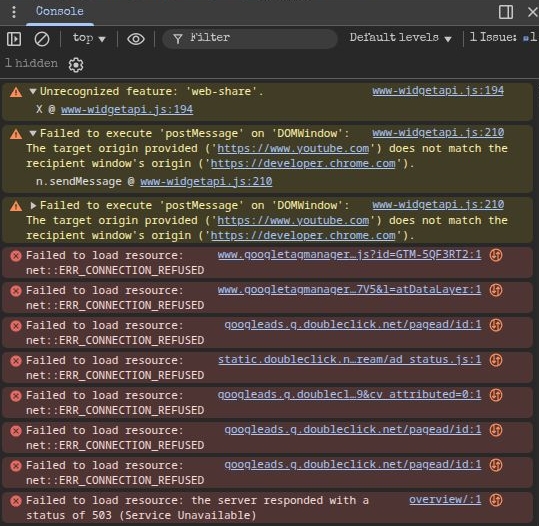
Done with the cascade lesson, and now it looks like I get to test out whether Ungoogled Chromium is a drop-in replacement for Chrome. (It should be, in theory at least.) I’m already really familiar with DevTools since I use it to bypass account walls like pinterest, download cool background images from Brave’s start page, and clean up ads Vivaldi’s blocker doesn’t catch, since it doesn’t have an easy block element option like Brave does. But I did learn that Lubuntu can play videos as long as I keep the quality low enough, which is another plus over the attempt at Budgie where they would barely play no matter what I did. (Because vbox, not because linux.) I also learned that developer.chrome.dev throws a bunch of errors when you use a decent DNS to block all their ads and other crap lmao.
If anyone’s interested, I highly recommend dns-for-family. I put it on every device as an early step in the set-up phase, and the only problem I’ve ever had with it is having to disable it to download Hamachi, which I barely use any more anyway.